
Building a Production-Grade RAG Chatbot on Azure
There's a specific moment that trips up a lot of "AI chatbot" tutorials: the demo works beautifully in a Jupyter notebook, and then someone asks how to actually ship it — with real users, real documents, and a security team asking uncomfortable questions. This guide is written for that moment. It walks through building a Retrieval-Augmented Generation (RAG) chatbot from an empty resource group all the way to a monitored, autoscaled, CI/CD-deployed service on Azure Kubernetes Service.
By the end, you'll have a chatbot that does one specific, useful thing: you upload a PDF, DOCX, or TXT file, ask a question about it, and GPT-4o answers using only the content of that file — not whatever it happened to memorize during training. That constraint is what makes RAG useful for real work, and it's also what makes the architecture more interesting than a plain chat wrapper.
Why RAG, and why this stack
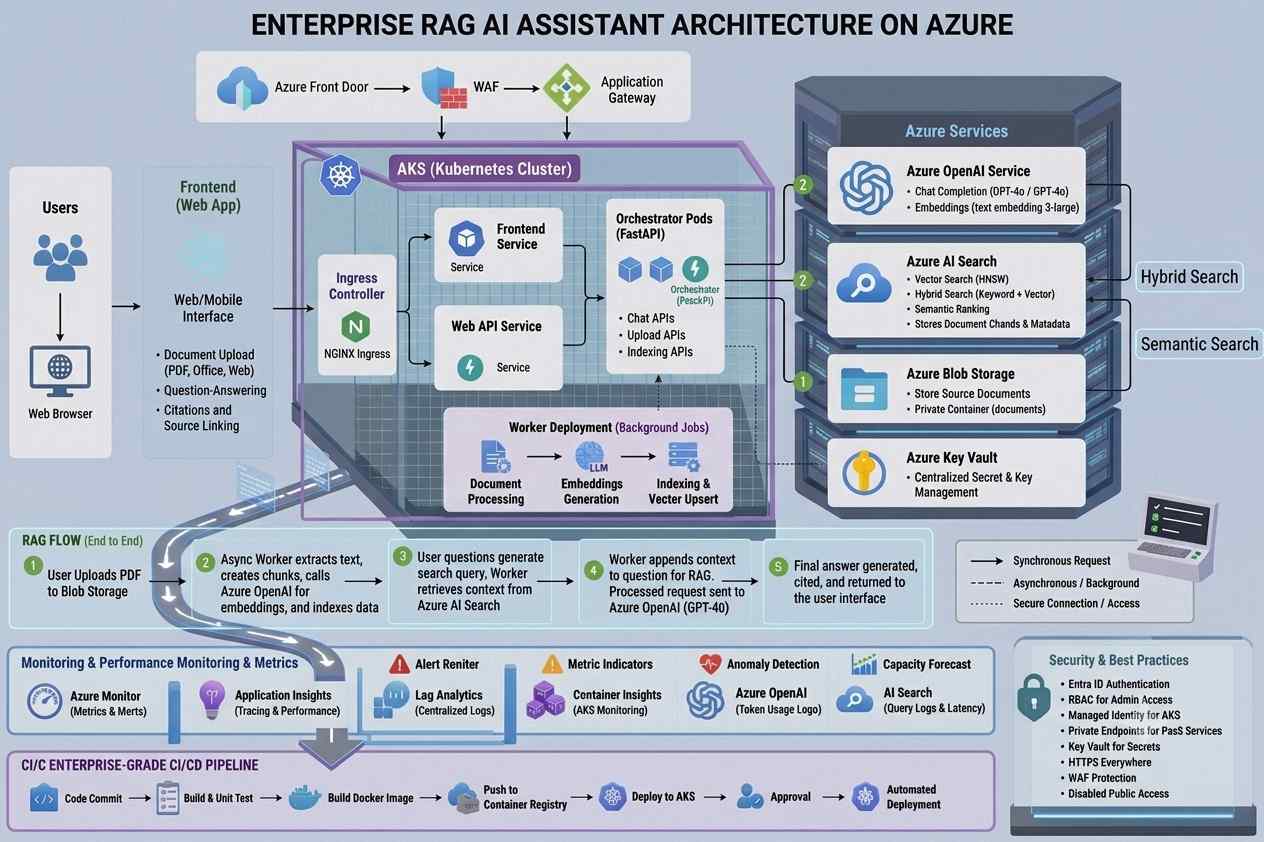
The one-paragraph version of how this works: when someone uploads a document, the backend splits it into chunks of roughly 512 tokens, sends each chunk to an embeddings model to get a vector representation, and stores both the text and the vector in a search index. When someone asks a question, the backend embeds the question the same way, asks the search index for the most similar chunks, and stuffs those chunks into a prompt as context. GPT-4o is then instructed to answer only from that context. If the answer isn't in the documents, it says so instead of guessing. That's the whole trick — and most of the engineering effort in this guide goes into making that trick reliable, secure, and cheap to run at scale.
The stack settles out like this: FastAPI for the backend, Next.js for the frontend, Azure AI Search as the vector store, Azure OpenAI for both embeddings (text-embedding-3-small) and completions (gpt-4o), Blob Storage for the raw files, AKS for orchestration, Key Vault for secrets, and GitHub Actions for CI/CD. Nothing here is exotic — the interesting part is how the pieces are wired together, particularly around identity and security, which is where most home-grown RAG projects quietly cut corners.
Picture the full request path: a browser talks to the Next.js frontend running on AKS, which calls the FastAPI backend, also on AKS. The backend calls Azure OpenAI for embeddings and chat, and Azure AI Search for retrieval, while Blob Storage holds the original files. Everything sits behind private endpoints inside a VNet, secrets live in Key Vault and are fetched through Workload Identity rather than environment variables, and a GitHub Actions pipeline builds images, pushes them to a container registry, and rolls them out to the cluster.
Before touching any of that, you'll need a few things installed and configured: an Azure subscription with Owner or Contributor access, Azure CLI 2.60+, kubectl 1.29+, Helm 3.14+, Docker 24+, Python 3.11+, Node 20 LTS, and a GitHub account (the free tier is fine). You'll also need to register a handful of resource providers once per subscription — AKS, ACR, Key Vault, Storage, Cognitive Services, Search, Networking, and the monitoring providers.
| az provider register --namespace Microsoft.ContainerService # AKS az provider register --namespace Microsoft.ContainerRegistry # ACR az provider register --namespace Microsoft.KeyVault az provider register --namespace Microsoft.Storage az provider register --namespace Microsoft.CognitiveServices # Azure OpenAI az provider register --namespace Microsoft.Search # AI Search az provider register --namespace Microsoft.Network az provider register --namespace Microsoft.Insights az provider register --namespace Microsoft.OperationalInsights |
Phases 1–3 Laying the foundation: resource group, storage, and search
Everything in this project lives inside one resource group, which makes teardown trivial later — a single az group delete removes the whole thing. East US is the region of choice here mainly because GPT-4o and text-embedding-3-small are both available there; if you pick a different region, check Azure OpenAI's model availability first, since coverage isn't uniform.
|
LOCATION="eastus" az group create \ |
With the resource group in place, the first real piece of infrastructure is Blob Storage, which holds the raw uploaded documents before anything gets chunked or indexed.
|
STORAGE_NAME="${PREFIX}docs$(openssl rand -hex 4)" az storage account create \ az storage container create \ |
That --allow-blob-public-access false flag isn't decorative — without it, anyone who guesses a blob URL can pull down a user's uploaded documents, and it's not something you can safely toggle after the fact without risking broken access for legitimate callers. Set it correctly the first time.
Next comes the vector store. Azure AI Search is where document chunks and their embeddings actually live, and it's what finds the semantically closest chunks when someone asks a question.
|
SEARCH_NAME="${PREFIX}-search" az search service create \ SEARCH_ADMIN_KEY=$(az search admin-key show \ |
The SKU choice matters more than it looks: Basic supports semantic ranking and vector fields, both required for RAG, while the Free tier doesn't support vectors at all. For anything beyond a personal prototype, plan on Standard S1 or higher.
Once the service is up, it needs an index schema — the shape that every document chunk will take, including its embedding vector.
|
# scripts/create_index.py endpoint = os.environ["AZURE_SEARCH_ENDPOINT"] client = SearchIndexClient(endpoint, AzureKeyCredential(key)) fields = [ vector_search = VectorSearch( index = SearchIndex(name="documents", fields=fields, vector_search=vector_search) |
| AZURE_SEARCH_ENDPOINT="https://${SEARCH_NAME}.search.windows.net" \ AZURE_SEARCH_KEY="$SEARCH_ADMIN_KEY" \ python scripts/create_index.py |
Phases 4–5 Bringing in the model: Azure OpenAI and Key Vault
With storage and search ready, the next stop is Azure OpenAI, where GPT-4o and the embeddings model actually get deployed.
|
OPENAI_NAME="${PREFIX}-openai" az cognitiveservices account create \ az cognitiveservices account deployment create \ az cognitiveservices account deployment create \ |
--sku-capacity 10 caps throughput at 10K tokens per minute, which is plenty for a single-developer test environment but worth bumping via a quota increase request before any real production traffic hits it.
Every credential this project generates — the OpenAI key, the search admin key, the storage connection string — goes into Key Vault rather than an .env file or a Kubernetes secret. The backend never reads secrets from environment variables at all; it fetches them at runtime through the Azure SDK using Managed Identity, which is a theme that carries through the rest of this build.
|
KV_NAME="${PREFIX}-kv-$(openssl rand -hex 3)" az keyvault create \ OPENAI_KEY=$(az cognitiveservices account keys list \ az keyvault secret set --vault-name $KV_NAME --name "openai-api-key" --value "$OPENAI_KEY" STORAGE_CONN=$(az storage account show-connection-string \ |
Phases 6–7 Writing the application: a shape worth sketching first
Before writing any code, it helps to lay out the project structure, since the backend and frontend end up split cleanly along the lines you'd expect — ingestion and chat logic on one side, chat UI and upload widget on the other, with Helm and GitHub Actions wrapping the whole thing.
| rag-chatbot/ ├── backend/ │ ├── app/ │ │ ├── main.py, ingest.py, chat.py, config.py, models.py │ ├── Dockerfile │ └── requirements.txt ├── frontend/ │ ├── app/ (page.tsx, components/, api/chat/route.ts) │ ├── Dockerfile │ └── package.json ├── helm/rag-chatbot/ (Chart.yaml, values.yaml, templates/) ├── .github/workflows/ (ci.yml, deploy.yml) └── scripts/ (create_index.py, bootstrap.sh) |
Secrets, loaded lazily. config.py is intentionally tiny — its whole job is to fetch a named secret from Key Vault using DefaultAzureCredential, cached so it's only fetched once per process.
|
import os @lru_cache(maxsize=None) |
Ingestion: from upload to vector. This is the pipeline that does the actual RAG groundwork — store the raw file, extract its text, chunk it, embed each chunk, and push everything into the search index.
|
import hashlib def get_openai_client() -> AzureOpenAI: def embed(texts: list[str]) -> list[list[float]]: def get_search_client() -> SearchClient: def upload_to_blob(filename: str, content: bytes) -> str: def extract_text(filename: str, content: bytes) -> str: def ingest_document(filename: str, content: bytes) -> dict: splitter = RecursiveCharacterTextSplitter(chunk_size=512, chunk_overlap=64) all_embeddings = [] documents = [] search = get_search_client() |
Chat: retrieval, then grounded generation. This is the other half of the RAG loop — embed the question, run a hybrid vector-plus-keyword search, build a context block from the results, and stream a completion that's instructed to stick to that context:
|
from typing import AsyncGenerator SYSTEM_PROMPT = """You are a helpful assistant. Answer questions based ONLY on the context provided below. def retrieve_chunks(query: str, top_k: int = 5) -> list[dict]: search_client = SearchClient( def build_context(chunks: list[dict]) -> str: async def stream_chat(question: str, history: list[dict]) -> AsyncGenerator[str, None]: messages = [ openai_client = AzureOpenAI( |
Notice the temperature is pinned to 0 — for a grounded question-answering task, you want deterministic, boring answers, not creative ones.
Wiring it into FastAPI. The app itself is small: a health check, an upload endpoint that validates file size and type before handing off to ingest_document, and a chat endpoint that streams tokens back over server-sent events.
|
from fastapi import FastAPI, UploadFile, File, HTTPException app = FastAPI(title="RAG Chatbot API", version="1.0.0") class ChatRequest(BaseModel): @app.get("/health") @app.post("/upload") @app.post("/chat") |
| fastapi==0.111.0 uvicorn[standard]==0.29.0 python-multipart==0.0.9 openai==1.35.3 azure-identity==1.17.1 azure-keyvault-secrets==4.8.0 azure-search-documents==11.6.0 azure-storage-blob==12.20.0 langchain-text-splitters==0.2.1 pypdf==4.2.0 python-docx==1.1.2 pydantic==2.7.3 |
Phase 8 The frontend: a chat window that streams
The frontend doesn't need to be elaborate — a scaffolded Next.js app with Tailwind covers it.
| cd frontend npx create-next-app@latest . --typescript --tailwind --eslint --app --no-src-dir --import-alias "@/*" |
The chat component is where most of the interesting client-side logic lives: it posts the question, then reads the response body as a stream of server-sent events, appending tokens to the last message as they arrive so the reply appears to type itself out:
|
'use client' interface Message { role: 'user' | 'assistant'; content: string } export default function ChatInterface() { useEffect(() => { bottomRef.current?.scrollIntoView({ behavior: 'smooth' }) }, [messages]) async function sendMessage() { const response = await fetch('/api/chat', { if (!response.ok || !response.body) { const reader = response.body.getReader() while (true) { return ( {messages.map((msg, i) => ( {msg.content} ))} {loading && Thinking…
className="flex-1 bg-gray-800 text-white rounded-xl px-4 py-2 text-sm outline-none focus:ring-2 focus:ring-violet-500" value={input} onChange={e => setInput(e.target.value)} onKeyDown={e => e.key === 'Enter' && sendMessage()} placeholder="Ask a question about your documents…" /> ) }
|
A thin API route proxies chat requests to the FastAPI backend rather than exposing the backend URL directly to the browser.
|
import { NextRequest } from 'next/server' export async function POST(req: NextRequest) { |
And the upload widget rounds things out, giving users a drag-and-drop-style file input and a status line that reports how many chunks got indexed.
|
'use client' export default function FileUpload() { async function handleFile(e: React.ChangeEvent) { const form = new FormData() if (res.ok) { return ( {status && {status} }) }
|
Phases 9–11 Packaging it: Docker, ACR, and AKS
Both services get multi-stage Dockerfiles, mostly to keep final image sizes down and to avoid shipping build tools into production containers.
|
# backend/Dockerfile FROM python:3.11-slim |
|
# frontend/Dockerfile FROM node:20-alpine AS builder FROM node:20-alpine AS runner |
Images need somewhere to live before AKS can pull them, which is what Azure Container Registry is for. Note admin-enabled false — nothing here authenticates with a username and password; Managed Identity handles image pulls instead:
|
ACR_NAME="${PREFIX}acr$(openssl rand -hex 3)" az acr create --name $ACR_NAME --resource-group $RG --location $LOCATION --sku Basic --admin-enabled false az acr build --registry $ACR_NAME --image "rag-backend:dev-$(git rev-parse --short HEAD)" ./backend |
|
ACR_NAME="${PREFIX}acr$(openssl rand -hex 3)" az acr create --name $ACR_NAME --resource-group $RG --location $LOCATION --sku Basic --admin-enabled false az acr build --registry $ACR_NAME --image "rag-backend:dev-$(git rev-parse --short HEAD)" ./backend |
|
ACR_NAME="${PREFIX}acr$(openssl rand -hex 3)" az acr create --name $ACR_NAME --resource-group $RG --location $LOCATION --sku Basic --admin-enabled false az acr build --registry $ACR_NAME --image "rag-backend:dev-$(git rev-parse --short HEAD)" ./backend |
Then comes the cluster itself, provisioned with OIDC issuance and Workload Identity turned on from the start — retrofitting identity federation onto an existing cluster is possible but much more annoying than enabling it up front.
|
AKS_NAME="${PREFIX}-aks" az aks create \ az aks get-credentials --resource-group $RG --name $AKS_NAME --overwrite-existing |
--attach-acr quietly does a lot of work here: it grants the cluster's managed identity the AcrPull role, so pods can pull images without any image-pull secret sitting in a manifest.Phase 12 Identity without secrets: Workload Identity
This is the part of the architecture that's easy to skip and expensive to regret skipping. A client secret — an API key, a connection string, a service principal password — is a string that lives somewhere: a Key Vault entry, a CI variable, a .env file. Every one of those places is a place it can leak. Workload Identity sidesteps the whole problem: a pod's Kubernetes service account token gets exchanged for an Azure AD token via OIDC federation, and Key Vault trusts that exchange directly. There's no secret to leak and nothing to rotate on a schedule.
|
IDENTITY_NAME="mi-rag-backend" IDENTITY_CLIENT_ID=$(az identity show --name $IDENTITY_NAME --resource-group $RG --query clientId -o tsv) KV_ID=$(az keyvault show --name $KV_NAME --resource-group $RG --query id -o tsv) AKS_OIDC_ISSUER=$(az aks show --name $AKS_NAME --resource-group $RG --query "oidcIssuerProfile.issuerUrl" -o tsv) az identity federated-credential create \ |
| kubectl run -it debug --image=curlimages/curl --rm -- \ curl -H "Metadata: true" \ "http://169.254.169.254/metadata/identity/oauth2/token?api-version=2018-02-01&resource=https://vault.azure.net" |
Phases 13–14 Deploying to Kubernetes
The Helm chart's service account is what links the federated credential to a running pod — the client-id annotation and the use: "true" label are both required for Workload Identity to actually engage.
| # helm/rag-chatbot/templates/serviceaccount.yaml apiVersion: v1 kind: ServiceAccount metadata: name: rag-backend-sa namespace: {{ .Values.namespace }} annotations: azure.workload.identity/client-id: {{ .Values.identity.clientId }} labels: azure.workload.identity/use: "true" |
The backend deployment itself is fairly ordinary — resource requests and limits, liveness and readiness probes against /health, and the one environment variable the app actually needs.
| # helm/rag-chatbot/templates/deployment-backend.yaml apiVersion: apps/v1 kind: Deployment metadata: name: rag-backend namespace: {{ .Values.namespace }} spec: replicas: {{ .Values.backend.replicas }} selector: matchLabels: app: rag-backend template: metadata: labels: app: rag-backend azure.workload.identity/use: "true" spec: serviceAccountName: rag-backend-sa containers: - name: backend image: {{ .Values.acr }}/rag-backend:{{ .Values.imageTag }} ports: - containerPort: 8000 env: - name: KEY_VAULT_URI value: {{ .Values.keyVaultUri }} resources: requests: { cpu: 250m, memory: 512Mi } limits: { cpu: 1000m, memory: 1Gi } livenessProbe: httpGet: { path: /health, port: 8000 } initialDelaySeconds: 30 periodSeconds: 15 readinessProbe: httpGet: { path: /health, port: 8000 } initialDelaySeconds: 10 periodSeconds: 5 |
| # helm/rag-chatbot/values.yaml namespace: default acr: yourregistry.azurecr.io imageTag: latest keyVaultUri: https://your-kv.vault.azure.net/ identity: clientId: "" # set via --set during deploy backend: replicas: 2 frontend: replicas: 2 backendUrl: http://rag-backend-svc:8000 ingress: enabled: true host: chat.yourdomain.com tlsSecretName: chat-tls |
| helm upgrade --install rag-chatbot ./helm/rag-chatbot \ --namespace default \ --set acr="${ACR_NAME}.azurecr.io" \ --set imageTag="$(git rev-parse --short HEAD)" \ --set keyVaultUri="$(az keyvault show --name $KV_NAME --resource-group $RG --query properties.vaultUri -o tsv)" \ --set identity.clientId="$IDENTITY_CLIENT_ID" \ --set ingress.host="chat.yourdomain.com" \ --wait --timeout 5m |
|
helm repo add ingress-nginx https://kubernetes.github.io/ingress-nginx helm repo add jetstack https://charts.jetstack.io |
| # helm/rag-chatbot/templates/ingress.yaml apiVersion: networking.k8s.io/v1 kind: Ingress metadata: name: rag-chatbot-ingress namespace: {{ .Values.namespace }} annotations: nginx.ingress.kubernetes.io/ssl-redirect: "true" cert-manager.io/cluster-issuer: letsencrypt-prod spec: ingressClassName: nginx tls: - hosts: [{{ .Values.ingress.host }}] secretName: {{ .Values.ingress.tlsSecretName }} rules: - host: {{ .Values.ingress.host }} http: paths: - path: /api pathType: Prefix backend: { service: { name: rag-backend-svc, port: { number: 8000 } } } - path: / pathType: Prefix backend: { service: { name: rag-frontend-svc, port: { number: 3000 } } } |
Phase 15 — Defense in depth
It's worth stepping back at this point and looking at the security posture as a whole, because it isn't one control — it's four independent layers, and an attacker has to get through all of them to reach anything sensitive.
The network layer puts everything inside a 10.0.0.0/16 VNet behind deny-all NSGs, keeps AKS nodes off the public internet entirely, routes ingress only through the controller, terminates TLS 1.3 at the edge, and resolves internal names through private DNS zones. The identity layer is everything just covered — Managed and Workload Identity throughout, no service passwords anywhere, least-privilege RBAC, Entra ID OIDC, and no routine use of cluster-admin. The data layer is Key Vault plus encryption at rest and in transit, private endpoints in front of both Blob Storage and AI Search, 90-day soft-delete on the vault, with customer-managed keys as an option if you need it. And the application layer is where the chatbot-specific risks get handled: rate limiting at 100 requests per minute, JWT validation, a 50KB cap on input size, a prompt-injection guard, the Content Safety API, a strict CORS allowlist, and HSTS/CSP headers.
That last layer is worth a concrete example, since "prompt injection guard" can otherwise sound hand-wavy. In practice it's rate limiting plus some basic input screening sitting directly in front of the chat endpoint.
|
from slowapi import Limiter, _rate_limit_exceeded_handler limiter = Limiter(key_func=get_remote_address) @app.post("/chat") |
Treat that phrase list as a starting point, not a finished defense — expand it based on your actual threat model rather than trusting a short blocklist to hold on its own.
Phase 16 Shipping changes: GitHub Actions end to end
The CI/CD pipeline is a fairly standard ten-stage flow: a push or PR to main triggers linting with ruff and tests with pytest, then a multi-stage Docker build, a Trivy scan that fails the build on HIGH or CRITICAL CVEs, a push of the SHA-tagged image to ACR, a deploy to a staging AKS namespace, Playwright smoke tests against staging, a manual approval gate, a rolling deploy to production, and finally a Slack notification either way. SHA-tagging every image means you can always trace a running container back to the exact commit that produced it.
|
# .github/workflows/ci.yml test-frontend: build-and-push: |
|
# .github/workflows/deploy.yml deploy-prod: |
The pipeline expects ten secrets configured in the repo: AZURE_CLIENT_ID, AZURE_TENANT_ID, AZURE_SUBSCRIPTION_ID, ACR_NAME, AKS_NAME, RG, KV_URI, MI_CLIENT_ID, BACKEND_URL, and SLACK_WEBHOOK.
Phase 17 Watching it run
Once the app is live, Container Insights gives you the operational picture — pod health, error rates, latency — without bolting on a separate observability stack.
| az aks enable-addons \ --name $AKS_NAME \ --resource-group $RG \ --addons monitoring \ --workspace-resource-id $(az monitor log-analytics workspace create \ --resource-group $RG --workspace-name "${PREFIX}-logs" --query id -o tsv) |
A handful of KQL queries cover most day-to-day questions — which pods are restarting, whether the backend is throwing 5xx errors, and how request latency is trending.
|
// Pod restarts in the last hour // Backend 5xx errors // Average response latency (from FastAPI logs) |
And an alert rule means you find out about restart loops from Azure Monitor instead of from a user's bug report:
| az monitor metrics alert create \ --resource-group $RG \ --name "rag-backend-pod-restarts" \ --scopes $(az aks show -g $RG -n $AKS_NAME --query id -o tsv) \ --condition "avg kube_pod_container_status_restarts_total > 3" \ --window-size 5m \ --evaluation-frequency 1m \ --severity 2 |
Phase 18 Proving it works: tests and load
A few layers of testing are worth having before you trust this with real traffic. Functional tests confirm the extraction logic handles each file type correctly and rejects the ones it shouldn't.
|
# tests/test_ingest.py def test_extract_pdf(): def test_extract_docx(): def test_unsupported_type(): |
RAG quality tests check that retrieval is actually returning something sensible against a document you've already ingested.
|
# tests/test_rag_quality.py @pytest.mark.integration @pytest.mark.integration |
|
# tests/test_rag_quality.py @pytest.mark.integration @pytest.mark.integration |
And a Locust script answers the question that matters before launch — how does this hold up under concurrent users.
|
# tests/locustfile.py class ChatUser(HttpUser): @task(3) @task(1) |
| locust -f tests/locustfile.py \ --host=https://chat.yourdomain.com \ --users=50 --spawn-rate=5 --run-time=5m --headless |
Phase 19 What it costs, and how to tear it down
For moderate usage in East US, the running cost lands somewhere in the neighborhood of $270–330 a month: about $140 for two D2s_v3 AKS nodes, $30–80 for GPT-4o usage, $5–15 for embeddings, $75 for AI Search on the Basic tier, and small change for Blob Storage, ACR, Key Vault, and Log Analytics. For a light prototype — say 100 questions a day at roughly 1,000 output tokens each — GPT-4o's per-token pricing works out to around $45 a month on its own, so the OpenAI line item scales with usage far more than the infrastructure does. Setting a hard quota in Azure OpenAI is the cheapest insurance against a runaway bill.
Phase 20 — Putting it on a resume
If this project is meant to demonstrate skill rather than just run in the background, it's worth writing up plainly what it actually shows: Azure OpenAI integration with both a chat and an embeddings model, hybrid vector-plus-BM25 search through Azure AI Search, a private AKS deployment with autoscaling and OIDC-based Workload Identity, a four-layer security model spanning network, identity, data, and application controls, a full lint-test-scan-deploy CI/CD pipeline with a manual production gate, and operational visibility through Container Insights and KQL. A short local quick-start rounds it out.
|
# Backend # Frontend |


No comments yet. Be the first to share your thoughts!