

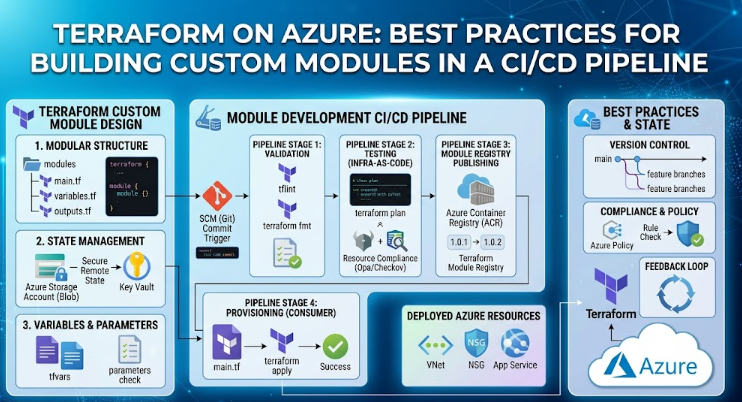
Terraform on Azure: Best Practices for Building Custom Modules in a CI/CD Pipeline
Infrastructure as Code (IaC) only pays off when it is repeatable, testable, and safe to change. On Azure, Terraform is the most common way to achieve this, but teams often go wrong not with Terraform itself, but with how they structure custom modules and wire them into a CI/CD pipeline. This article walks through a practical, production-grade approach.
Why Build Custom Modules at All
Azure's Terraform provider (azurerm) exposes resources at a very granular level. Without modules, teams end up copy-pasting the same virtual network, AKS cluster, or storage account configuration across environments — and every copy drifts slightly from the others.
A custom module solves this by encapsulating a reusable, opinionated pattern:
- One well-tested definition of "how we build an AKS cluster" or "how we build a hub-spoke VNet"
- Consistent tagging, naming, and security defaults baked in
- A smaller, safer interface (inputs/outputs) instead of raw resource blocks
The goal isn't to wrap every single azurerm_* resource — it's to package decisions your team has already made so they don't need to be re-made (or re-argued) in every environment.
Structuring a Custom Module
A clean, idiomatic layout for an Azure module repository looks like this:
terraform-azurerm-aks/
├── main.tf              # resource definitions
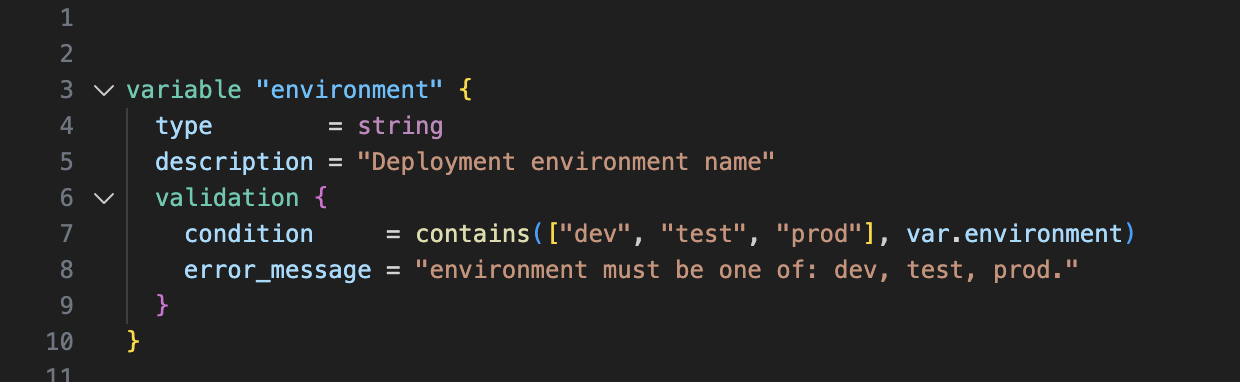
├── variables.tf         # inputs with types, defaults, validation
├── outputs.tf           # outputs consumers actually need
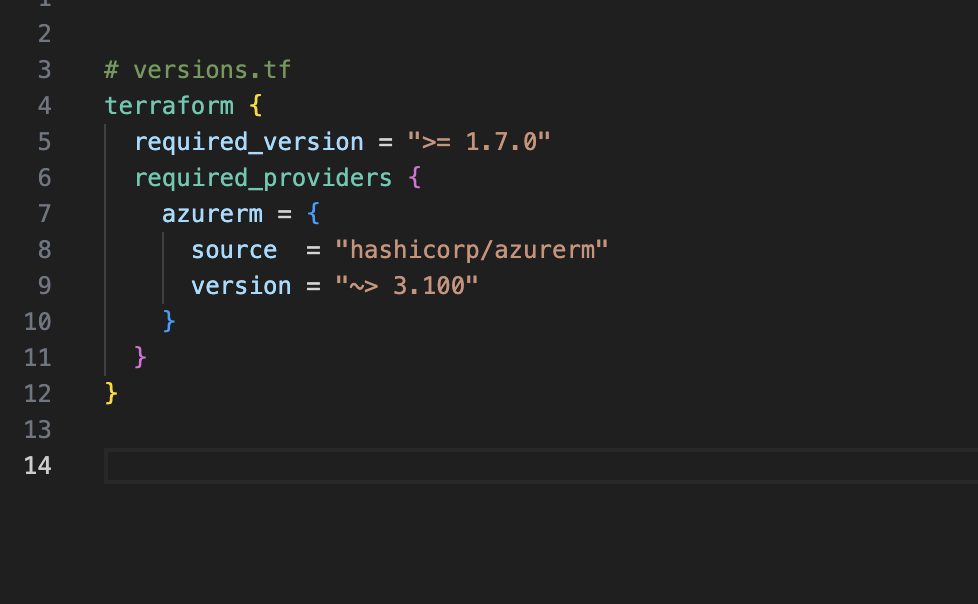
├── versions.tf          # required_providers + required_version
├── locals.tf            # naming, tagging, computed values
├── README.md            # auto-generated docs (terraform-docs)
├── examples/
│   └── basic/
│       └── main.tf      # a working example that also doubles as a test fixture
└── tests/
    └── aks.tftest.hcl   # native Terraform tests (1.6+)
Key practices:
1. Pin provider and Terraform versions explicitly
2. Validate inputs, don't just accept them
3. Keep outputs minimal and purposeful — export IDs, names, and connection info that consuming stacks actually need, not everything the resource happens to expose.
4. Use locals.tf for naming and tagging conventions so every resource created by the module is consistent, e.g. <workload>-<env>-<region>-<resource-type>.
5. Avoid provider blocks inside modules. Providers should be configured once, in the root/calling configuration — never inside a reusable module. This keeps modules composable across subscriptions and backend configurations.
Versioning and Distribution
Treat modules like a software product with a release process, not a folder people copy:
- Host modules in their own Git repositories (one module per repo is the common pattern), or use a monorepo with clear subpaths and tag-based versioning per module.
- Publish via a private Terraform registry (Terraform Cloud/HCP, Azure DevOps Artifacts feeds, or a Git-tag-based source) so consumers pin an exact version.
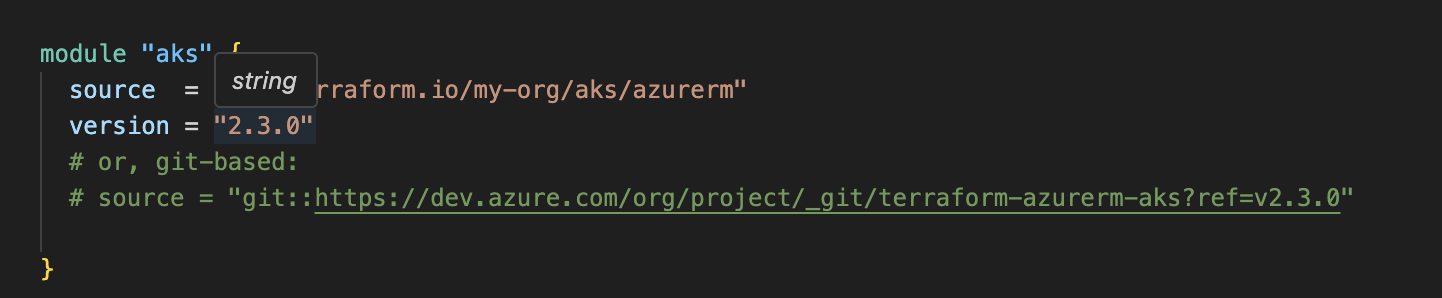
- Follow semantic versioning: breaking input/output changes bump the major version; new optional variables bump minor; bug fixes bump patch.
- Never let environments point at a module's
mainorHEADbranch always pin a tag.
Testing Modules Before They Reach a Pipeline
terraform validateandterraform fmt -checkcatch syntax and style issues immediately.tflintwith theazurermplugin catches Azure-specific misconfigurations (deprecated arguments, invalid SKUs, etc.).checkovortfsecstatic security scanning (public storage accounts, missing encryption, open NSGs).- Native Terraform tests (
.tftest.hcl, Terraform 1.6+) assert on plan output and, optionally, apply against real infrastructure in an ephemeral test subscription
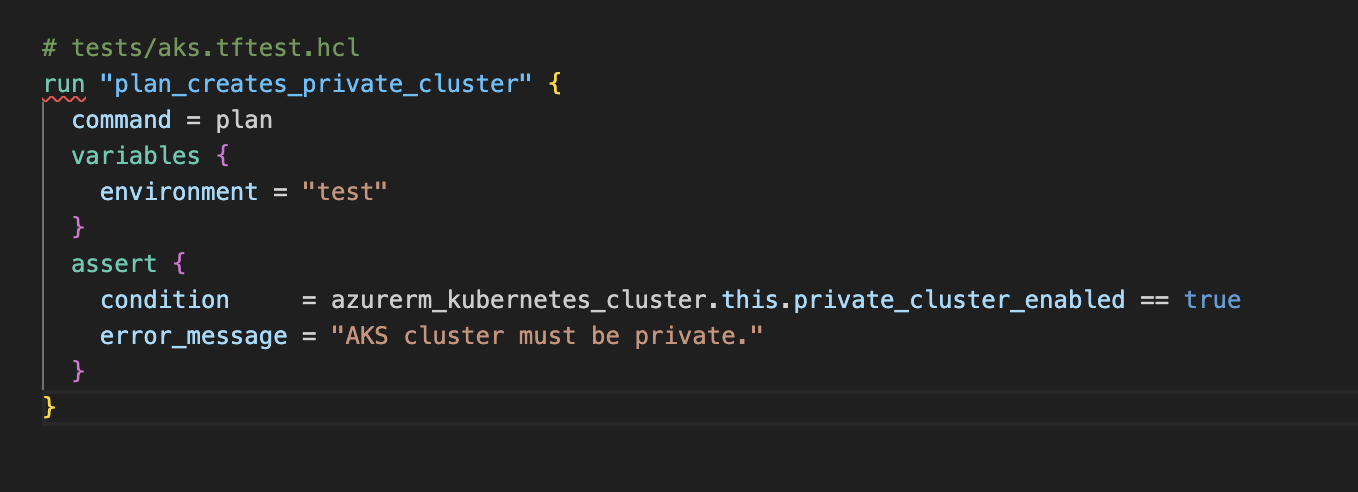
Run these checks against the module repo itself, independently of any environment repo — this is what makes the module trustworthy before anyone consumes it.
Designing the CI/CD Pipeline
A solid pipeline separates two concerns: testing/publishing the module and deploying environments that consume it. Below is a pattern that works whether you're on Azure DevOps Pipelines or GitHub Actions.
Stage 1 — Module CI (runs on the module repo)
terraform fmt -checkandterraform validatetflint- Security scan (
tfsec/checkov) terraform test(native tests)- On merge to
mainwith a semver tag → publish to the registry
Stage 2 — Environment CD (runs on the environment/root repo that consumes the module)
- Init with a remote backend (Azure Storage Account + state locking)
- Plan — always run on pull requests, output posted as a PR comment for review
- Manual approval gate for
prod(and optionallytest) - Apply — only after approval, using the exact plan artifact generated in step 2 (never re-plan-and-apply blindly)
- Drift detection — a scheduled job that runs
terraform planon a cadence and alerts if the plan is non-empty
Example: Azure DevOps YAML skeleton
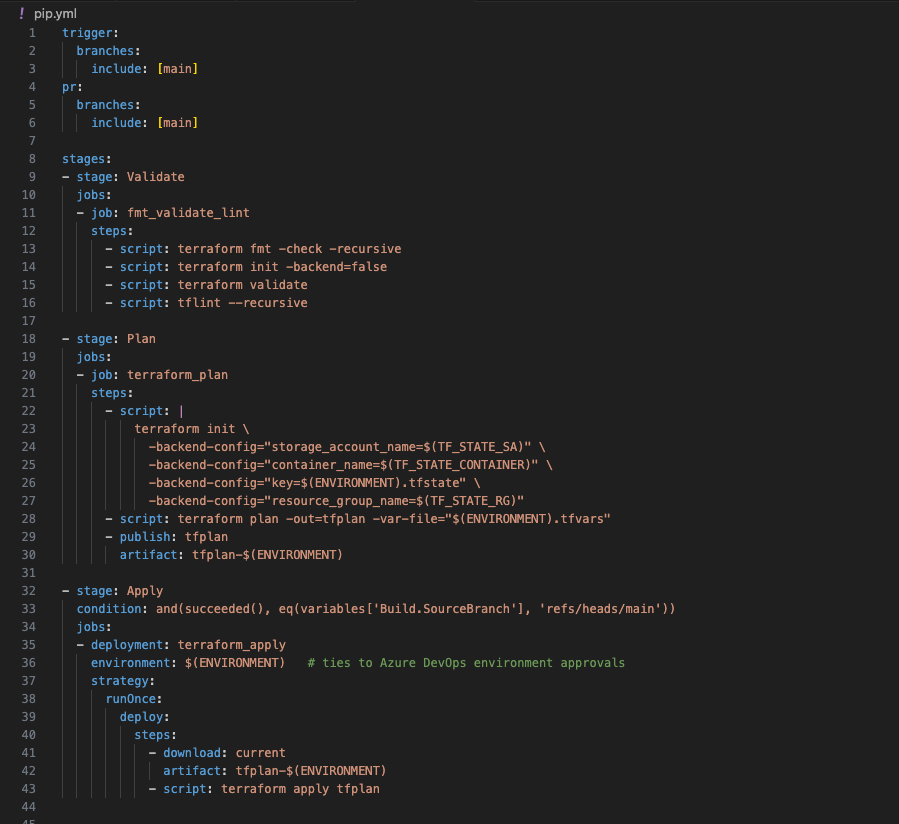
The same shape translates directly to GitHub Actions using environment: protection rules for the manual gate and actions/upload-artifact / download-artifact for passing the plan file between jobs.
State and Secrets Management
- Remote state in Azure Storage with a dedicated storage account per environment tier (or at minimum, strict container/key separation), state locking enabled by default via blob leasing.
- Authenticate the pipeline with a service principal or, preferably, Workload Identity Federation / OIDC rather than long-lived client secrets — both Azure DevOps and GitHub Actions support OIDC federation with Microsoft Entra ID.
- Scope permissions tightly. The pipeline's identity should have only the RBAC roles needed for the resources that environment manages — avoid a single subscription-Owner identity shared across all pipelines.
- Keep secrets out of
.tfvarsfiles in source control. Pull them at runtime from Azure Key Vault (via the pipeline's key vault task, or theazurerm_key_vault_secretdata source with appropriate access policies).
Environment Promotion Pattern
Rather than maintaining separate copies of Terraform code per environment, keep one root module per environment that consumes the same versioned custom modules with different variable files:
├── dev/
│ ├── main.tf # module "aks" { source = "...//aks", version = "2.3.0" }
│ └── dev.tfvars
├── test/
│ ├── main.tf
│ └── test.tfvars
└── prod/
├── main.tf
└── prod.tfvars
Promotion becomes: bump the module version pin in test, verify the plan, then bump it in prod. This gives you an auditable, reviewable diff for every promotion instead of an implicit "whatever's on main."
Common Pitfalls to Avoid
- Monolithic modules that try to provision an entire environment in one module — hard to test, hard to version, hard to reuse.
- Hardcoded values (region, subscription ID, resource group names) inside the module instead of variables.
- Applying without a saved plan artifact, which risks apply-time drift from what was actually reviewed.
- No PR-based plan review — every change to
prodshould be visible as a plan diff before it's approved. - Sharing one state file across environments — always isolate state per environment at minimum, and often per logical component too.
Summary
The combination that works well in practice is: small, versioned, well-tested custom modules published to a private registry, consumed by thin environment-specific root configurations, deployed through a pipeline that always plans on PR, gates apply behind approval, and applies the exact reviewed plan. Get this scaffolding right once, and every subsequent Azure environment becomes a configuration change rather than a new engineering effort.




No comments yet. Be the first to share your thoughts!