

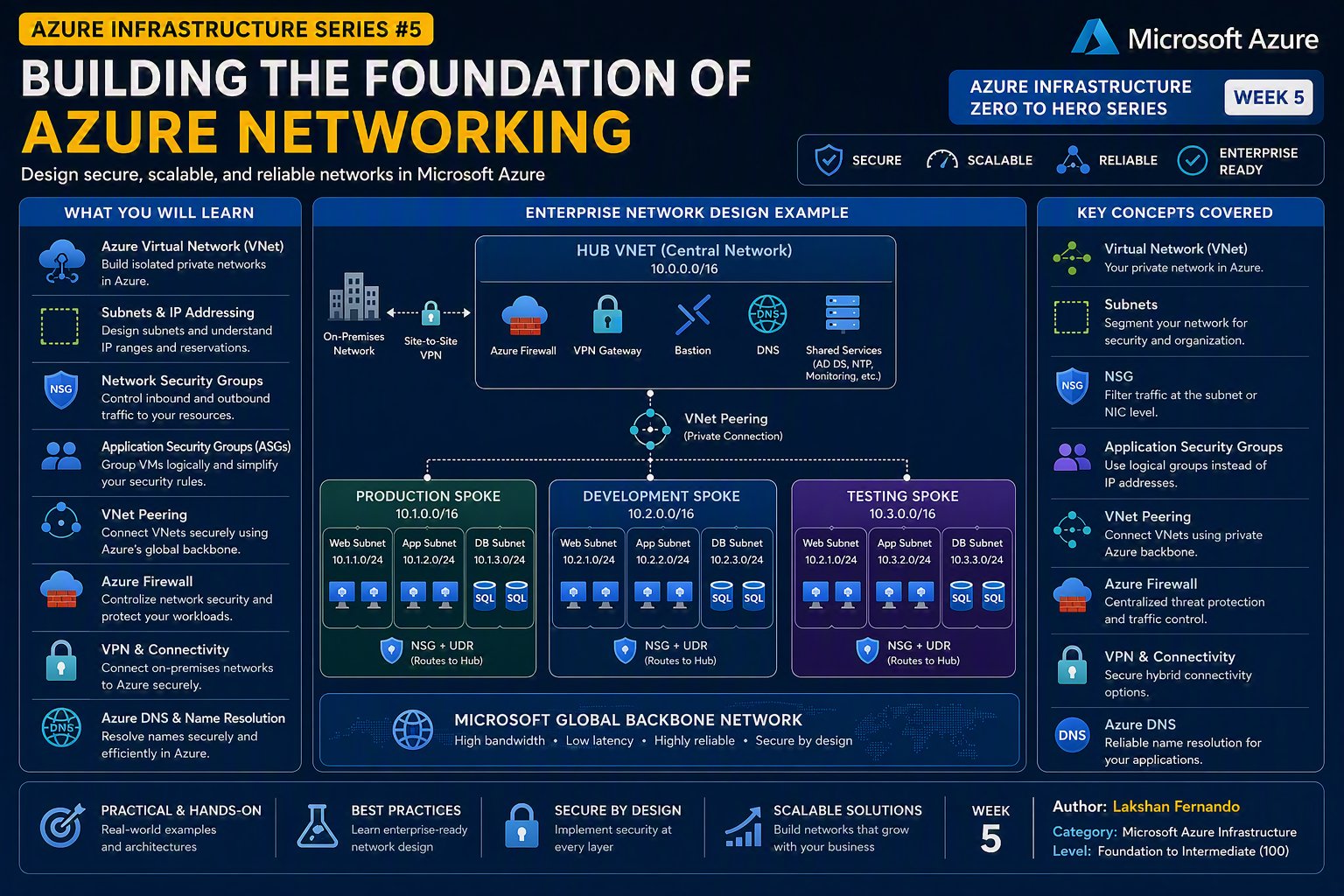
Azure Infrastructure Zero to Hero Series – Week 5
Author: Lakshan Fernando
Category: Microsoft Azure Infrastructure
Level: Foundation to Intermediate (100)
Azure Virtual Networks (VNets): Building the Foundation of Azure Networking
Introduction
In the previous article, we explored Azure Resource Manager (ARM) and learned how every Azure resource is deployed and managed through Microsoft's centralized management layer.
Now it's time to understand one of the most fundamental services in Microsoft Azure—Azure Virtual Networks (VNets).
Just as every physical data center requires switches, routers, VLANs, IP addressing, and firewalls to enable communication between servers, Azure provides virtual networks to perform the same role in the cloud.
Whether you're deploying a single virtual machine, an Azure Kubernetes Service (AKS) cluster, an App Gateway, Azure Firewall, or an enterprise-scale landing zone, almost every Azure infrastructure deployment begins with designing a virtual network.
A poorly designed network can lead to security vulnerabilities, scalability issues, IP address conflicts, and operational complexity. On the other hand, a well-designed virtual network provides a secure, scalable, and highly available foundation for cloud workloads.
In this article, we'll explore Azure Virtual Networks in detail, understanding their architecture, components, connectivity options, and best practices used by enterprise organizations.
What is an Azure Virtual Network?
An Azure Virtual Network (VNet) is a logically isolated network in Microsoft Azure that enables Azure resources to securely communicate with each other, the internet, and on-premises networks.
Think of a virtual network as the cloud equivalent of your organization's physical network.
It provides:
- IP address management
- Network segmentation
- Resource isolation
- Secure communication
- Internet connectivity
- Hybrid connectivity
- DNS integration
- Traffic routing
Without a virtual network, most Azure Infrastructure as a Service (IaaS) resources, such as virtual machines, cannot communicate securely.
Why Do We Need Virtual Networks?
Imagine deploying ten virtual machines into Azure.
Without a network:
- They cannot communicate with each other.
- Users cannot connect through RDP or SSH.
- Applications cannot access databases.
- Load balancers cannot distribute traffic.
- Firewalls cannot inspect traffic.
Azure Virtual Networks provide the communication layer between resources.
Azure Networking Architecture
A typical Azure networking architecture looks like this:

The VNet acts as the parent network, while subnets divide the network into smaller logical segments.
Address Space
When creating a VNet, one of the first decisions is selecting an IP address range, known as the "address space."
Example:
10.0.0.0/16
This defines the private IP range available for resources inside the virtual network.
Common private address ranges include:
|
CIDR |
Address Range |
|
10.0.0.0/8 |
Large enterprise networks |
|
172.16.0.0/12 |
Medium-sized environments |
|
192.168.0.0/16 |
Small networks and home labs |
Azure recommends using private IP ranges defined in RFC 1918.
Understanding CIDR Notation
Azure uses CIDR (Classless Inter-Domain Routing) notation to define network sizes.
|
CIDR |
Total IP Addresses |
|
/24 |
256 |
|
/23 |
512 |
|
/22 |
1,024 |
|
/21 |
2,048 |
|
/20 |
4,096 |
|
/16 |
65,536 |
Larger environments should plan IP addressing carefully to avoid future overlaps.
Subnets
Subnets divide a virtual network into smaller logical sections.

Each subnet isolates workloads while allowing controlled communication.
Why Use Subnets?
Subnets improve:
- Security
- Performance
- Network organization
- Access control
- Scalability
Instead of placing every server in one network, workloads are separated according to their function.
Azure Reserved IP Addresses
Azure reserves the first four IP addresses and the last IP address in every subnet.
Example:

This is important when calculating subnet capacity.
Private IP vs Public IP
Azure resources may have:
Private IP
Used for communication inside Azure.
Example:
10.0.1.10
Only accessible within connected networks.
Public IP
Provides internet connectivity.
Example:
20.x.x.x
Allows users to access applications from the internet.
Dynamic vs Static Private IP
Azure supports two private IP allocation methods.
Dynamic
Azure automatically assigns an available IP address.
Static
The administrator specifies the IP address.
Static addresses are commonly used for:
- Domain Controllers
- DNS Servers
- Firewalls
- Load Balancers
- Application servers requiring consistent addressing
Network Security Groups (NSGs)
An NSG acts as a virtual firewall.
It controls inbound and outbound traffic using rules.
Example:
|
Priority |
Source |
Destination |
Port |
Action |
|
100 |
Internet |
Web Server |
443 |
Allow |
|
110 |
Internet |
Web Server |
80 |
Allow |
|
200 |
Internet |
Any |
3389 |
Deny |
NSGs can be associated with:
- Subnets
- Network Interfaces (NICs)
Application Security Groups (ASGs)
Instead of creating rules based on IP addresses, Azure allows grouping virtual machines logically.

Benefits:
- Easier administration
- Simplified security rules
- Reduced maintenance
Azure DNS
Every VNet includes Azure-provided DNS by default.
Options include:
- Azure-provided DNS
- Custom DNS servers
- Active Directory-integrated DNS
- Azure DNS Private Resolver
Custom DNS is commonly used in enterprise hybrid environments.
Internet Connectivity
Resources inside a virtual network can communicate with the internet in several ways:
- Public IP Address
- Azure Load Balancer
- Azure Application Gateway
- Azure Firewall
- Azure NAT Gateway
Each option serves different networking requirements.
Hybrid Connectivity
Many organizations connect Azure with on-premises data centers.
Azure supports:
Site-to-Site VPN
Encrypted IPsec tunnel between Azure and on-premises.
Suitable for:
- Small businesses
- Branch offices
- Disaster recovery
Point-to-Site VPN
Secure connection for individual users.
Common for remote workers.
ExpressRoute
Dedicated private connection to Microsoft Azure.
Benefits:
- Higher bandwidth
- Lower latency
- Improved reliability
- No internet traversal
Preferred for enterprise production workloads.
VNet Peering
Virtual networks can communicate directly using VNet peering.
Benefits:
- Low latency
- High bandwidth
- Microsoft backbone network
- No VPN gateway required
Peering can be:
- Regional
- Global

User Defined Routes (UDRs)
Azure automatically creates system routes.
Administrators can override these using user-defined routes.
UDRs are commonly used with:
- Azure Firewall
- Network Virtual Appliances (NVAs)
- Inspection appliances
Service Endpoints
Service Endpoints allow Azure services to be accessed securely over the Microsoft backbone network.
Traffic never leaves Microsoft's network.
Private Endpoints
Private Endpoints provide private IP access to Azure PaaS services.
Benefits:
- No public internet exposure
- Improved security
- Reduced attack surface
Private Endpoints are now Microsoft's recommended approach for securing PaaS resources.
Azure Bastion
Azure Bastion enables secure RDP and SSH access through the Azure Portal.
Benefits:
- No Public IP required
- Browser-based connectivity
- Reduced attack surface
- Centralized management
Azure Bastion is recommended for production environments.
Azure NAT Gateway
When multiple virtual machines require outbound internet connectivity, Azure NAT Gateway provides the following:
- Scalable outbound access
- Stable public IP addresses
- Improved performance
It eliminates the need to assign individual public IPs to each VM.

This hub-and-spoke architecture is one of the most common enterprise networking models in Azure.
Best Practices
Microsoft recommends the following networking practices:
- Plan IP address ranges before deployment.
- Avoid overlapping address spaces.
- Separate workloads into dedicated subnets.
- Apply NSGs using least privilege.
- Use Azure Bastion instead of public IPs for administration.
- Secure PaaS services using private endpoints.
- Use VNet Peering for Azure-to-Azure communication.
- Use ExpressRoute for mission-critical hybrid connectivity.
- Monitor networking using Azure Network Watcher.
- Document network architecture and IP addressing.
Common Mistakes
Avoid these common networking mistakes:
- Creating one large subnet for every workload.
- Using overlapping IP ranges.
- Assigning public IPs unnecessarily.
- Opening RDP (3389) or SSH (22) directly to the internet.
- Ignoring NSG rule priorities.
- Not planning for future network growth.
- Mixing production and development workloads in the same subnet.
- Forgetting to secure PaaS resources with Private Endpoints.
Summary
Azure Virtual Networks provide the networking foundation for almost every Azure infrastructure deployment. They enable secure communication between resources, support hybrid connectivity, and allow organizations to build scalable, enterprise-grade network architectures in the cloud.
A well-designed VNet includes carefully planned address spaces, properly segmented subnets, effective use of network security groups, secure connectivity through VPN or ExpressRoute, and modern security features such as Azure Bastion and private endpoints.
As Azure environments continue to grow, network design becomes increasingly important. Investing time in planning IP addressing, segmentation, routing, and security from the beginning will reduce operational complexity and improve the long-term scalability and resilience of your cloud infrastructure.
Key Takeaways
- Azure Virtual Networks (VNets) are the foundation of Azure networking.
- Every VNet requires a carefully planned private IP address space.
- Subnets provide logical segmentation and improve security.
- Azure reserves five IP addresses in every subnet.
- Network Security Groups control inbound and outbound traffic.
- VNet Peering enables fast, secure communication between Azure networks.
- Hybrid connectivity is achieved through VPN Gateway or ExpressRoute.
- Private Endpoints and Azure Bastion significantly improve security by reducing public exposure.
- Proper network planning is critical for building scalable and enterprise-ready Azure environments.


No comments yet. Be the first to share your thoughts!