

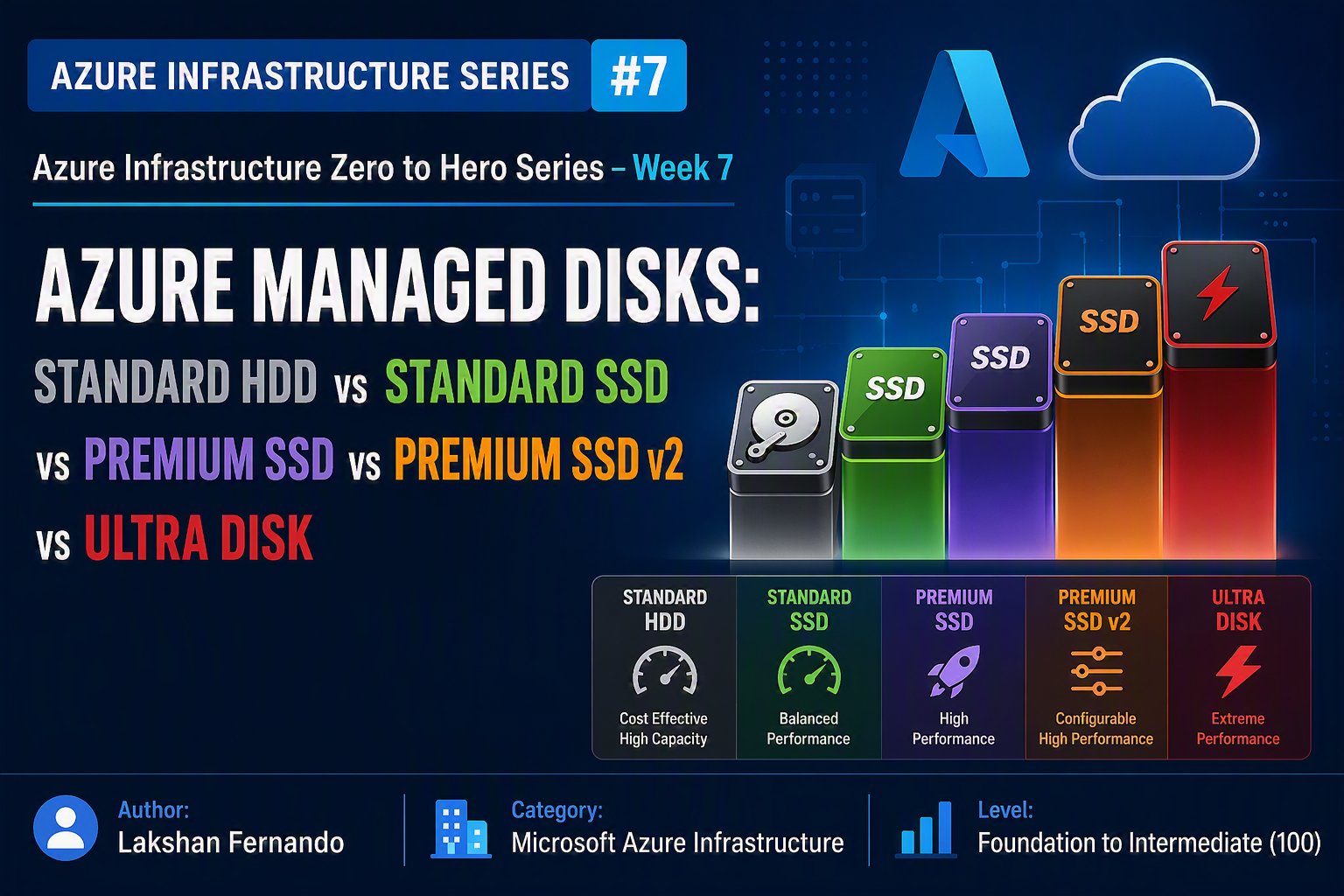
Azure Infrastructure Zero to Hero Series – Week 7
Author: Lakshan Fernando
Category: Microsoft Azure Infrastructure
Level: Foundation to Intermediate (100)
Azure Managed Disks Explained: Choosing the Right Disk for Performance, Reliability, and Cost
Storage is one of the most critical components of any virtual machine. Even the fastest CPU and largest amount of memory cannot compensate for poor disk performance. Applications such as SQL Server, SAP, enterprise ERP systems, web applications, Active Directory, and file servers all rely heavily on storage performance.
Microsoft Azure offers several managed disk options designed for different workloads from low-cost archive storage to ultra-high-performance disks capable of delivering hundreds of thousands of IOPS.
Choosing the wrong disk type can lead to poor application performance, increased latency, unnecessary costs, or overprovisioned infrastructure. In this article, we'll explore Azure Managed Disks in detail, compare all available disk types, understand their use cases, and learn how to select the right disk for your workloads.
What is an Azure Managed Disk?
An Azure Managed Disk is a block-level storage volume managed entirely by Microsoft Azure. It is used as the storage backend for Azure Virtual Machines and eliminates the complexity of managing storage accounts manually.
Before Managed Disks were introduced, administrators had to create and manage Azure Storage Accounts, monitor capacity limits, and distribute virtual hard disks (VHDs) across multiple storage accounts. Managed Disks simplify this process by automatically handling storage provisioning, scaling, availability, encryption, and maintenance.
With Managed Disks, Azure manages:
- Storage infrastructure
- Availability and redundancy
- Performance
- Disk provisioning
- Maintenance
- Scalability
- Encryption at rest
This allows administrators to focus on applications rather than storage management.
Types of Azure Managed Disks
Azure currently offers five primary managed disk types:
- Standard HDD
- Standard SSD
- Premium SSD
- Premium SSD v2
- Ultra Disk
Each disk type is optimized for different workloads and price points.
Understanding Disk Performance Metrics
Before selecting a disk type, it's important to understand the key performance metrics.
IOPS (Input/Output Operations Per Second)
IOPS measures the number of read and write operations a disk can perform every second.
Higher IOPS means:
- Faster databases
- Better application responsiveness
- Reduced latency
- Higher transaction throughput
Throughput
Throughput measures the amount of data transferred every second.
Usually measured in:
- MB/s
High throughput benefits:
- File servers
- Backup operations
- Video processing
- Analytics
- Large database operations
Latency
Latency measures the delay between requesting data and receiving it.
Lower latency means:
- Faster SQL queries
- Better application performance
- Improved user experience
Standard HDD
Standard HDD is Azure's lowest-cost managed disk offering.
These disks use traditional magnetic storage and are designed for workloads that do not require high performance.
Best Use Cases
- Backup servers
- Archive storage
- Development environments
- File shares with infrequent access
- Small domain controllers
- Low-traffic applications
Advantages
- Lowest storage cost
- Suitable for non-critical workloads
- Reliable for basic storage requirements
Limitations
- Higher latency
- Lower IOPS
- Lower throughput
- Not recommended for production databases
Standard SSD
Standard SSD provides significantly better performance than Standard HDD while maintaining a reasonable cost.
These disks use solid-state technology, resulting in lower latency and improved responsiveness.
Best Use Cases
- Web servers
- Small production workloads
- Development and testing
- Light application servers
- Small business applications
Advantages
- Better performance than HDD
- Lower latency
- Cost-effective
- Suitable for many production workloads
Limitations
- Performance is lower than Premium SSD
- Not ideal for highly transactional databases
Premium SSD
Premium SSD is the most commonly used managed disk for enterprise production workloads.
These disks provide consistent low latency and predictable performance.
Best Use Cases
- SQL Server
- Microsoft Exchange
- Active Directory
- Enterprise web applications
- ERP systems
- Production Virtual Machines
Advantages
- Consistent performance
- Low latency
- High IOPS
- High throughput
- Excellent reliability
Limitations
- Higher cost than Standard SSD
- Performance tied to disk size
Premium SSD v2
Premium SSD v2 is Microsoft's next-generation premium storage offering.
Unlike Premium SSD, performance is no longer tied to disk capacity. Administrators can independently configure:
- Disk size
- IOPS
- Throughput
This provides much greater flexibility and can significantly reduce costs for workloads that require high performance without large storage capacity.
Key Features
- Independent performance tuning
- Lower latency
- Better price-to-performance ratio
- Flexible scaling
- Dynamic performance adjustments
Best Use Cases
- SQL Server
- Large databases
- High-performance web applications
- Enterprise applications
- Business-critical workloads
Ultra Disk
Ultra Disk is Azure's highest-performance managed disk offering.
It is specifically designed for mission-critical workloads requiring extremely high IOPS, ultra-low latency, and maximum throughput.
Ultra Disk allows administrators to change performance settings without detaching the disk from the virtual machine.
Best Use Cases
- SAP HANA
- Oracle
- SQL Server Enterprise
- High-performance databases
- Financial systems
- Large transactional workloads
Advantages
- Extremely high IOPS
- Extremely low latency
- High throughput
- Independent performance configuration
- Dynamic tuning without downtime
Limitations
- Highest cost
- Not available in all Azure regions
- Supported only by compatible VM sizes
Managed Disk Comparison

Understanding Disk Sizes
Managed disks are available in predefined sizes.
Examples include:
|
Disk Size |
Capacity |
|
P1 |
4 GiB |
|
P2 |
8 GiB |
|
P3 |
16 GiB |
|
P4 |
32 GiB |
|
P6 |
64 GiB |
|
P10 |
128 GiB |
|
P15 |
256 GiB |
|
P20 |
512 GiB |
|
P30 |
1 TiB |
|
P40 |
2 TiB |
|
P50 |
4 TiB |
|
P60 |
8 TiB |
|
P70 |
16 TiB |
|
P80 |
32 TiB |
With Premium SSD, disk performance generally increases as the disk size increases. Premium SSD v2 and Ultra Disk remove this dependency by allowing performance to be configured independently.
OS Disk vs Data Disk
Every Azure Virtual Machine includes at least one OS disk.
OS Disk
Stores:
- Windows or Linux operating system
- Boot files
- System configuration
- Installed software
Data Disk
Used for:
- Databases
- Application files
- Logs
- Shared files
- Business data
Separating the operating system from application data improves performance, simplifies backups, and reduces recovery time during failures.
Disk Redundancy Options
Azure provides multiple redundancy options to protect data against hardware failures.
Locally Redundant Storage (LRS)
- Three copies within a single datacenter
- Lowest cost
- Suitable for most workloads
Zone-Redundant Storage (ZRS)
- Replicates data across multiple Availability Zones within the same region
- Higher availability
- Protects against datacenter failures
Geo-Redundant Storage (GRS)
- Replicates data to another Azure region
- Used primarily for disaster recovery
- Not supported for all managed disk scenarios
Choose the redundancy option based on your availability and disaster recovery requirements.
Disk Encryption
Azure automatically encrypts managed disks at rest using Microsoft-managed keys.
For organizations with stricter compliance requirements, Customer-Managed Keys (CMK) can be used through Azure Key Vault.
Additional security features include:
- Azure Disk Encryption (ADE)
- Server-side encryption
- Encryption in transit
- Trusted Launch
- Confidential VMs (supported scenarios)
Disk Snapshots
Snapshots create point-in-time copies of managed disks.
Common use cases include:
- Backup before software upgrades
- Disaster recovery
- Testing
- Rollback after failed changes
- Migration
Snapshots are incremental, meaning only changed blocks are stored after the first snapshot, helping reduce storage costs.
Azure Backup Integration
Managed disks integrate seamlessly with Azure Backup.
Benefits include:
- Automated backups
- Application-consistent backups (where supported)
- Retention policies
- Instant restore
- Cross-region restore (supported scenarios)
- Centralized backup management
For production workloads, regular backups should always be part of your operational strategy.
Performance Optimization Best Practices
To maximize storage performance:
- Use Premium SSD or Premium SSD v2 for production workloads.
- Place databases on dedicated data disks rather than the OS disk.
- Separate transaction logs and database files onto different disks when applicable.
- Use disk striping (Storage Spaces on Windows or RAID on Linux) for higher throughput where supported.
- Monitor disk metrics such as IOPS, throughput, latency, and queue depth using Azure Monitor.
- Resize disks when performance requirements increase.
- Avoid using Standard HDD for latency-sensitive applications.
Cost Optimization Tips
Storage costs can quickly add up if disks are oversized or underutilized.
To optimize costs:
- Use Standard HDD for archive and infrequently accessed data.
- Choose Standard SSD for development and light production workloads.
- Use Premium SSD for most enterprise applications.
- Select Premium SSD v2 when you need flexible performance tuning without purchasing unnecessary capacity.
- Reserve Ultra Disk for mission-critical workloads where latency and throughput directly impact business operations.
- Regularly review Azure Advisor recommendations and monitor disk utilization.
Real-World Recommendations

Common Mistakes to Avoid
Many organizations experience performance issues due to poor disk selection. Avoid these common pitfalls:
- Using Standard HDD for production databases.
- Hosting database files and transaction logs on the OS disk.
- Selecting larger Premium SSD disks solely to gain additional IOPS instead of evaluating Premium SSD v2.
- Ignoring disk latency metrics during troubleshooting.
- Failing to enable backups or snapshots before major system changes.
- Overprovisioning expensive Ultra Disks for workloads that can perform efficiently on Premium SSD or Premium SSD v2.
Final Thoughts
Azure Managed Disks are the foundation of reliable and high-performing virtual machines. Selecting the correct disk type is just as important as choosing the right VM size, as storage directly influences application responsiveness, database performance, and overall user experience.
For most enterprise workloads, Premium SSD remains a dependable choice, offering consistent performance and broad compatibility. Premium SSD v2 introduces greater flexibility by allowing independent configuration of capacity, IOPS, and throughput, making it an excellent option for modern, performance-sensitive applications. Ultra Disk is reserved for the most demanding, mission-critical workloads where ultra-low latency and maximum performance are essential.
By understanding the strengths and trade-offs of each managed disk type, implementing proper monitoring, and following Azure best practices, organizations can build storage solutions that are cost-effective, scalable, and resilient.
Key Takeaways
- Azure Managed Disks simplify storage management by eliminating the need to manage storage accounts.
- Standard HDD is best suited for archive, backup, and infrequently accessed workloads.
- Standard SSD provides a cost-effective balance for development, testing, and light production applications.
- Premium SSD is the recommended choice for most enterprise production virtual machines.
- Premium SSD v2 offers independent performance tuning, making it ideal for modern databases and business-critical applications.
- Ultra Disk delivers the highest levels of IOPS, throughput, and lowest latency for mission-critical workloads.
- Monitor storage performance regularly and align disk selection with application requirements rather than choosing the most expensive option by default.


No comments yet. Be the first to share your thoughts!