

Azure Infrastructure Zero to Hero Series – Week 8
Author: Lakshan Fernando
Category: Microsoft Azure Infrastructure
Level: Foundation to Intermediate (100)
Designing Highly Available Azure Virtual Machines: Availability Sets vs Availability Zones vs Virtual Machine Scale Sets
One of the biggest advantages of moving workloads to Microsoft Azure is the ability to build highly available and resilient infrastructure without investing in expensive on-premises hardware. However, simply deploying a virtual machine in Azure does not automatically make it highly available.
Hardware failures, planned maintenance, unexpected outages, operating system crashes, and sudden increases in traffic can all affect application availability. To minimize downtime and improve business continuity, Azure provides several features specifically designed to improve the availability and scalability of virtual machines.
The three most important technologies are:
- Availability Sets
- Availability Zones
- Virtual Machine Scale Sets (VMSS)
Although these services may appear similar at first glance, each solves a different problem. Understanding when and how to use them is essential for designing reliable cloud architectures.
In this article, you'll learn how each option works, their differences, advantages, limitations, real-world use cases, and Azure best practices for building resilient virtual machine deployments.
Why High Availability Matters
Every minute of downtime can have significant consequences for an organization, including:
- Financial losses
- Reduced productivity
- Customer dissatisfaction
- Damage to business reputation
- Failure to meet Service Level Agreements (SLAs)
Common causes of downtime include:
- Physical server failures
- Planned Azure maintenance
- Rack or power failures
- Network issues
- Storage failures
- Operating system crashes
- Application failures
Azure provides built-in capabilities to reduce the impact of these events.
Understanding Azure's Physical Infrastructure
Before exploring Azure availability features, it's helpful to understand how Azure datacenters are organized.
 Each Availability Zone is physically separated within the same Azure region and has independent:
- Power supply
- Cooling systems
- Network infrastructure
This physical separation provides protection against datacenter-level failures.
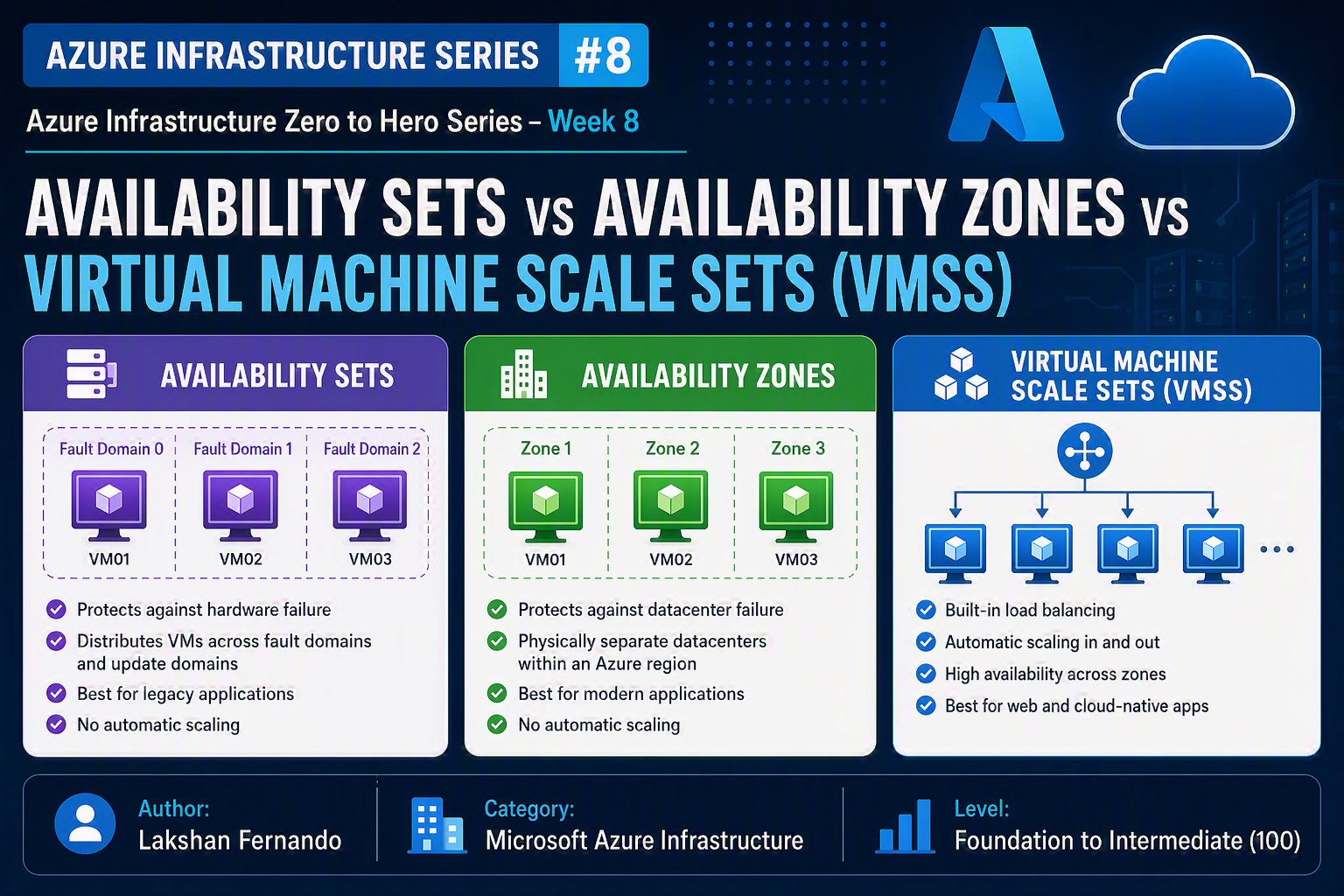
What is an Availability Set?
An Availability Set is an Azure feature that protects virtual machines from hardware failures and planned maintenance within a single datacenter.
When multiple VMs are placed in the same Availability Set, Azure distributes them across different Fault Domains and Update Domains.
This minimizes the risk of all VMs becoming unavailable simultaneously.
Understanding Fault Domains
A Fault Domain represents a group of hardware components that share a common power source and network switch.
Examples include:
- Server rack
- Power unit
- Network switch
- Storage cluster
If one Fault Domain experiences a hardware failure, only the virtual machines within that domain are affected.
Azure automatically places VMs across multiple Fault Domains whenever possible.
If Fault Domain 1 fails, VM01 and VM03 continue running.
Understanding Update Domains
Azure regularly performs planned maintenance to update the underlying infrastructure.
To avoid rebooting every VM simultaneously, Azure uses Update Domains.
Azure updates only one Update Domain at a time, ensuring other VMs remain operational.
Benefits of Availability Sets
Availability Sets provide protection against:
- Hardware failures
- Planned maintenance
- Rack failures
- Network switch failures
Typical SLA:
- 99.95% when two or more VMs are deployed in the same Availability Set.
Limitations of Availability Sets
Availability Sets do not protect against:
- Datacenter outages
- Region-wide failures
- Application crashes
- Operating system corruption
- Software bugs
They are limited to a single Azure datacenter.
Real-World Example: Availability Set
Consider a company running two domain controllers.
If the physical server hosting DC01 fails, DC02 remains online and continues authenticating users.
What is an Availability Zone?
Availability Zones provide a higher level of protection than Availability Sets.
Each Availability Zone is a physically separate datacenter within the same Azure region.
Every zone has independent:
- Power
- Cooling
- Networking
- Physical infrastructure
Deploying VMs across multiple zones protects applications from complete datacenter failures.
Availability Zone Architecture

If Zone 1 becomes unavailable, workloads running in Zones 2 and 3 continue operating.
Benefits of Availability Zones
Protection against:
- Datacenter failures
- Power outages
- Cooling failures
- Large-scale hardware failures
- Planned maintenance
Typical SLA:
- 99.99% for zone-redundant virtual machines.
Limitations of Availability Zones
Availability Zones do not protect against:
- Regional outages
- Application failures
- Poor application design
- Data corruption
Not every Azure region supports Availability Zones.
Zone-Redundant Applications
A typical production architecture might include:

Users continue accessing the application even if one zone becomes unavailable.
What is a Virtual Machine Scale Set (VMSS)?
A Virtual Machine Scale Set (VMSS) allows Azure to deploy and manage a group of identical virtual machines as a single resource.
Instead of manually creating multiple VMs, Azure automatically provisions, configures, and manages VM instances based on demand.
VM Scale Sets are designed for:
- High availability
- Automatic scaling
- Load balancing
- Large-scale applications
How VM Scale Sets Work

Each VM runs the same application and configuration.
Traffic is distributed evenly across all instances.
Auto Scaling
One of the most powerful features of VMSS is automatic scaling.
Azure can automatically increase or decrease the number of virtual machines based on predefined rules.
Examples include:
- CPU utilization
- Memory usage (via Azure Monitor)
- Network traffic
- Queue length
- Custom metrics
- Schedules

This ensures performance during peak demand while reducing costs during quieter periods.
Benefits of VM Scale Sets
VM Scale Sets provide:
- Automatic scaling
- Load balancing
- High availability
- Simplified management
- Consistent VM configuration
- Rolling upgrades
- Integration with Azure Monitor
- Integration with Azure Load Balancer
- Integration with Azure Application Gateway
VMSS Deployment Modes
VM Scale Sets support two orchestration modes.
Uniform Orchestration
All VM instances are identical.
Best suited for:
- Web applications
- APIs
- Stateless services
- Microservices
Flexible Orchestration
Allows different VM sizes and configurations within the same scale set.
Best suited for:
- Enterprise workloads
- Mixed infrastructure
- Applications requiring more flexibility
Availability Sets vs Availability Zones vs VM Scale Sets

When Should You Use Availability Sets?
Choose Availability Sets when:
- Migrating legacy applications.
- Running a small number of virtual machines.
- Protecting workloads from hardware failures within a datacenter.
- Applications do not require automatic scaling.
- Availability Zones are unavailable in your chosen Azure region.
Common workloads include:
- Domain Controllers
- Small SQL Server deployments
- File Servers
- Legacy line-of-business applications
When Should You Use Availability Zones?
Choose Availability Zones when:
- High availability is a business requirement.
- Applications must survive datacenter failures.
- Building enterprise or mission-critical systems.
- The Azure region supports Availability Zones.
Common workloads include:
- Production web applications
- SQL Server Always On Availability Groups
- Enterprise APIs
- SAP systems
- Business-critical workloads
When Should You Use VM Scale Sets?
Choose VM Scale Sets when:
- Application demand changes frequently.
- Automatic scaling is required.
- Running stateless workloads.
- Building cloud-native applications.
- Deploying large web applications or APIs.
Typical workloads include:
- E-commerce platforms
- Public websites
- REST APIs
- Kubernetes worker nodes
- Microservices
- Batch processing systems
Combining These Features
These technologies are not always mutually exclusive.

This architecture provides:
- Load balancing
- Auto scaling
- Zone redundancy
- High availability
- Fault tolerance
Such designs are commonly used for enterprise applications requiring both resilience and elasticity.
Best Practices
When designing Azure virtual machine architectures:
- Deploy production workloads across multiple Availability Zones whenever supported.
- Use Availability Sets for legacy applications that cannot be redesigned but still require protection from hardware failures.
- Use VM Scale Sets for stateless applications that need automatic scaling.
- Place VMSS instances behind Azure Load Balancer or Azure Application Gateway.
- Store application state in external services such as Azure SQL Database, Azure Storage, or Azure Cache for Redis.
- Use Azure Monitor and Autoscale rules to optimize performance and costs.
- Test failover scenarios regularly to validate resilience.
- Combine Azure Backup and Azure Site Recovery with availability features for comprehensive disaster recovery.
Common Mistakes to Avoid
Avoid these common pitfalls:
- Assuming a single VM is highly available.
- Deploying all production VMs in the same Availability Zone.
- Using Availability Sets as a replacement for disaster recovery.
- Enabling auto scaling without defining sensible scaling rules.
- Storing session state locally on VMSS instances instead of external storage.
- Ignoring application architecture—high availability requires both resilient infrastructure and resilient software.
Final Thoughts
Designing resilient infrastructure in Azure involves more than simply deploying virtual machines. Understanding the differences between Availability Sets, Availability Zones, and Virtual Machine Scale Sets enables you to build architectures that are highly available, fault tolerant, scalable, and cost-effective.
Availability Sets protect against hardware failures within a single datacenter, making them suitable for legacy and smaller workloads. Availability Zones extend protection across physically separate datacenters, offering higher availability for mission-critical applications. Virtual Machine Scale Sets add automatic scaling and simplified management, making them the preferred choice for modern, cloud-native applications that experience variable demand.
Selecting the right option—or combining multiple features—depends on your workload, business continuity requirements, and budget. By applying Azure best practices and designing for resilience from the outset, you can ensure your applications remain available, responsive, and ready to meet business demands even during unexpected failures.
Key Takeaways
- Availability Sets protect virtual machines from hardware failures and planned maintenance within a single datacenter.
- Availability Zones provide resilience against complete datacenter failures by distributing resources across physically separate facilities.
- Virtual Machine Scale Sets simplify deployment and management of identical VMs while enabling automatic scaling based on demand.
- Availability Sets are best suited for legacy workloads, while Availability Zones are recommended for production and mission-critical applications.
- VM Scale Sets are ideal for stateless, cloud-native workloads that require elasticity and load balancing.
- High availability is most effective when combined with monitoring, backups, disaster recovery, and well-designed application architecture.


kavindu