

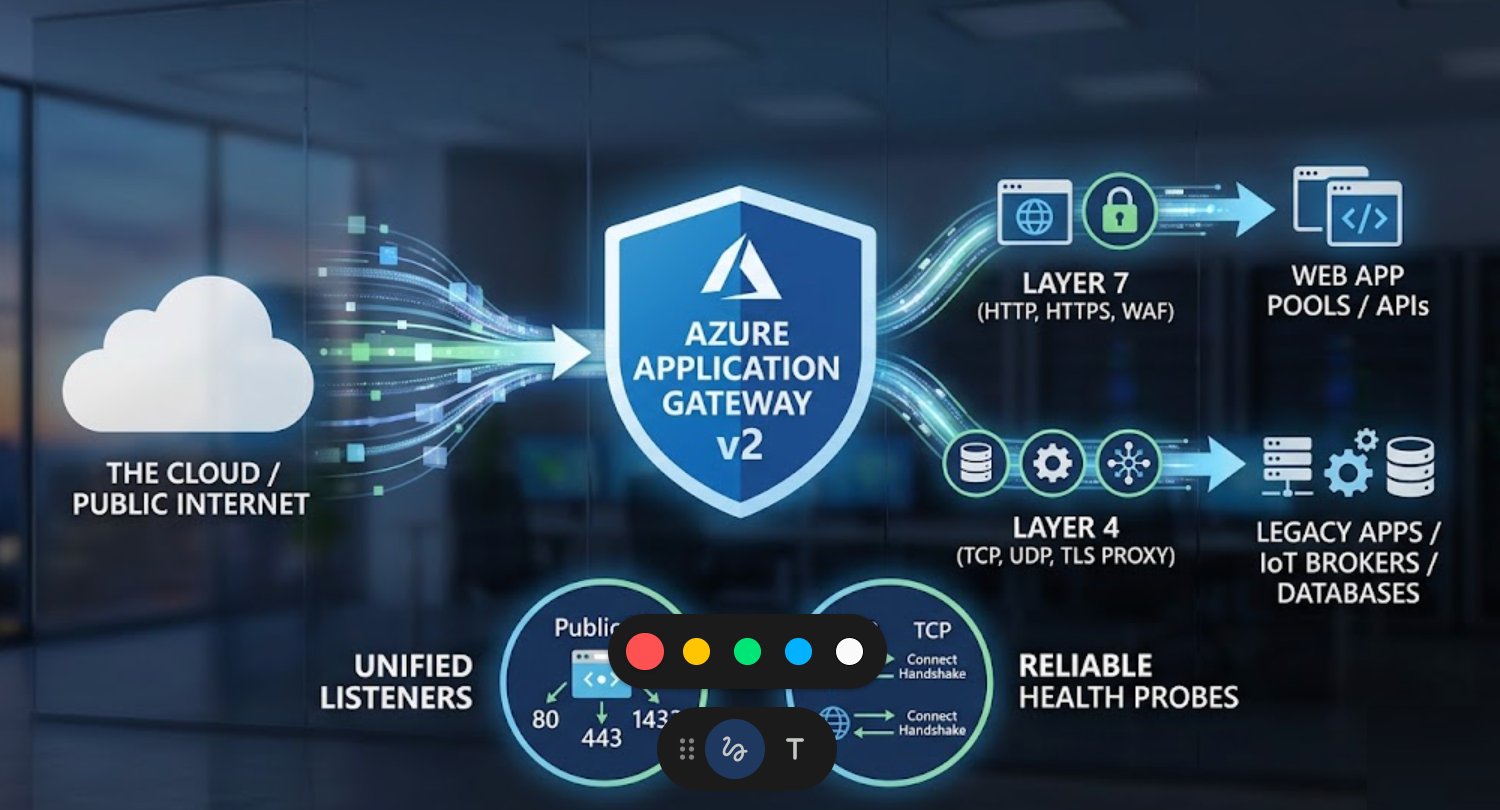
In modern cloud networking, the traditional separation between web traffic and raw data streams is vanishing. Architects now require a single, resilient entry point that can handle a corporate website (HTTPS), a database cluster (SQL on TCP), and an IoT broker (Secure MQTT on TLS) simultaneously.
With the Azure Application Gateway v2 SKU, Microsoft has transitioned this service from a simple web load balancer into a sophisticated Application Delivery Controller (ADC). This article explores how to architect, enable, and monitor a multi-protocol gateway.
- Architectural Foundation: The Terminating Proxy
Unlike a standard Network Load Balancer (NLB) which operates via "flow-through" packet forwarding, the Application Gateway is a Terminating Proxy.
How it Works:
-
- Client Connection: The client connects to the Gateway’s Frontend IP. The Gateway terminates this connection at the listener level.
- Gateway Processing: For Layer 7 (HTTP/S), it can inspect headers, paths, and WAF rules. For Layer 4 (TCP/TLS), it acts as a transparent proxy, simply acknowledging the handshake.
- Backend Connection: The Gateway initiates a new connection from its internal subnet IP to the backend server.
Key Benefit: This architecture enables TLS Offloading. You can secure your TCP services with high-grade certificates at the Gateway, while your backend servers receive unencrypted traffic, saving significant CPU cycles on the backend.
2. Protocol Breakdown: HTTP, HTTPS, TCP, and TLS
| Protocol | Layer | Key Feature | Common Use Case |
| HTTP | L7 | Path-based routing, WAF | Standard web traffic, Redirects |
| HTTPS | L7 | SSL Termination, WAF | Secure web apps, APIs |
| TCP | L4 | High-performance proxy | SQL Server (1433), SSH (22), SMTP |
| TLS | L4 | Non-HTTP SSL Termination | Secure MQTT (8883), LDAPS (636) |
Note: While UDP support is available for specific scenarios like DNS, TCP and TLS remain the primary focus for connection-oriented enterprise apps.
3. The "Gatekeepers" Listeners and Rules
The Listener is the logical endpoint that waits for traffic. To support a unified stack, you must configure different listener types on the same Gateway.
-
- Layer 7 Listeners: Require a host header (e.g.,
api.testlab.com) and can use Path-based rules to send/imagesto one pool and/videosto another. - Layer 4 Listeners: Do not understand URLs or host headers. They route traffic based purely on the Frontend Port. If traffic hits Port 1433, it follows the TCP rule to the SQL pool.
- Layer 7 Listeners: Require a host header (e.g.,
4. Health Probes The Pulse of Your Backend
A gateway is only as reliable as its monitoring. Because TCP/TLS doesn't have "Status Codes" (like 200 OK), the probing logic is different.
-
-
HTTP/S Probes: The Gateway sends a
GETrequest to a specific path (e.g.,/health) and expects a response between 200–399. - TCP Probes: The Gateway performs a TCP Three-Way Handshake. If the backend server responds with a
SYN-ACK, it is considered healthy. - TLS Probes: These perform the TCP handshake followed by a TLS Greeting. This ensures the backend's encryption service is actually responsive.
-
5. Implementation Guide the Configuration Path
To enable these features, follow this specific configuration path in the Azure Portal or via CLI.
Step 1: Enable the Feature
Ensure you are using the Standard_v2 or WAF_v2 SKU. Navigate to your Application Gateway resource.
Step 2: The Portal Path
-
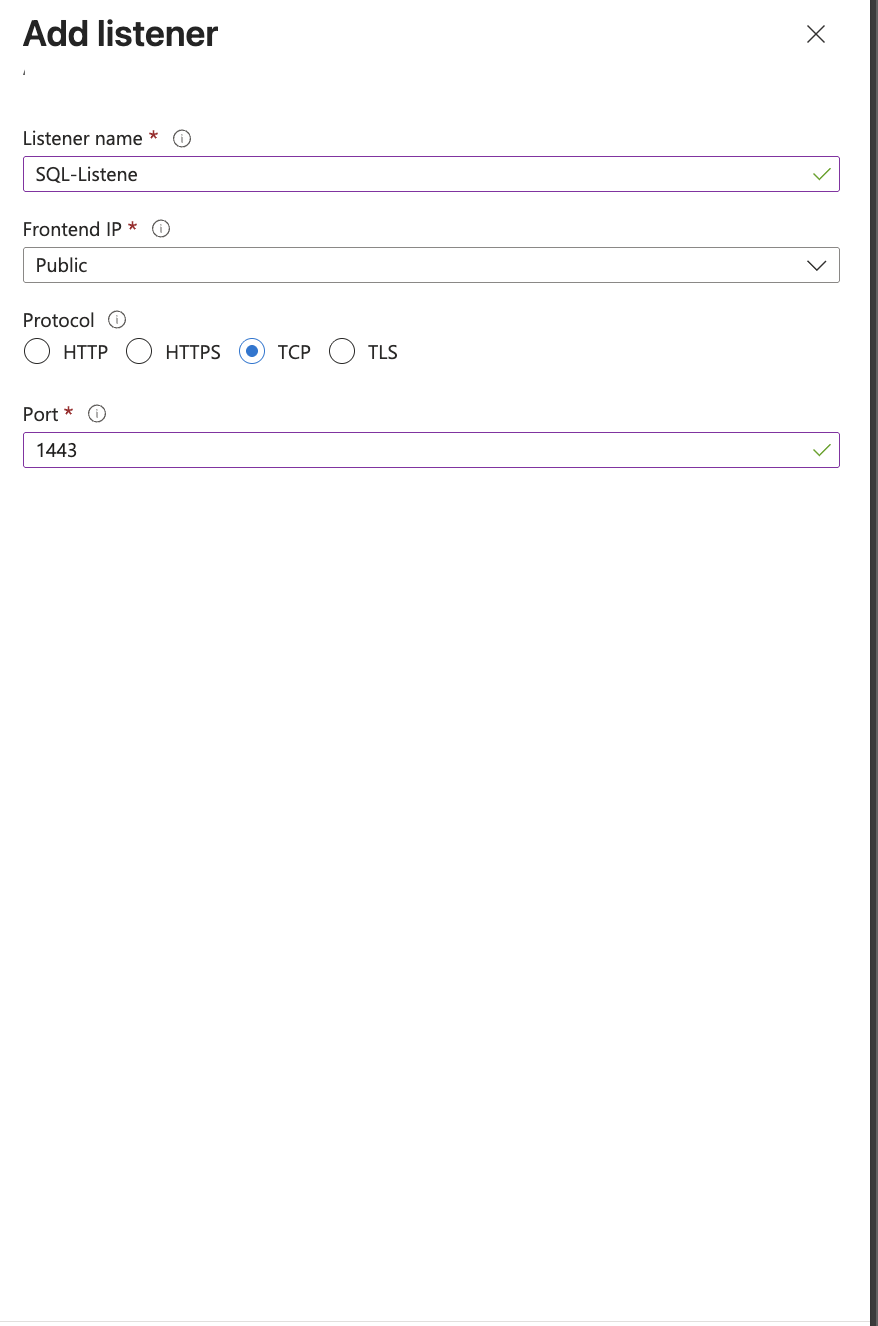
- Listeners: Go to Settings > Listeners > + Add Listener. Choose Protocol: TCP or TLS. Set your port (e.g., 1433 for SQL).
- Backend Settings: Go to Settings > Backend settings > + Add.
-
- Crucial: Select Protocol: TCP (not HTTP). This removes the requirement for host headers and cookie affinity.
-
- Rules: Go to Settings > Configuration > + Add Routing Rule. Link your TCP Listener to your Backend Setting and Backend Pool.
Step 2: CLI Path (Automation)
To add a TCP listener for a SQL server via Azure CLI:
--gateway-name MyGateway \
--name SQL-Listener \
--resource-group MyRG \
--frontend-port 1433 \
--protocol Tcp
-
- WAF Inspection: The Web Application Firewall does not inspect TCP/TLS traffic. It only provides protection for HTTP/HTTPS listeners
-
Client IP Visibility: Because it is a proxy, your backend sees the Gateway's Private IP. If you need the original Client IP for TCP traffic, ensure your application supports Proxy Protocol v2.
-
IP Protocol: Application Gateway v2 supports one public IP per protocol (IPv4/IPv6). You can use this single IP for all L4 and L7 listeners combined.
No comments yet. Be the first to share your thoughts!